

Please realize that the screening and scheduling of Icons is the most important Business Staff activity.
KEEP GOOD NOTES ON ICON CALLS OR VISITS, SAVE AND ATTACH TO ICON INTAKE SHEET FOR ICON ATTORNEY’S REFERENCE.
Screening questions to ask and make notes for the Icon attorney:
1. “What County is your case in?” If it’s not one we serve, say “I’m sorry we cannot legally represent you.” And bow out.
2. “What is your opposing person’s First Name, Middle Name, Last Name, Maiden Name if female, and Date of Birth?” Handwrite a note with the opposing person’s name, including maiden name.
Immediately use MFLP to check for a “Conflict”.
If there is a conflict, say, “I’m sorry we cannot legally represent you.”
When asked “Why not”, say, “It may or may not be a conflict, and I’m sorry, but that is all I can say.” And bow out.
Hang up quickly as possible.
If there is no conflict, continue.
More Family Law Profits Web-Based Application’s Unique Capabilities With Helpful Instructions
New Initial Consult (Icon) Tracking
Click Here to see More Family Law Profits Application’s Unique Capabilities With Helpful Instructions.
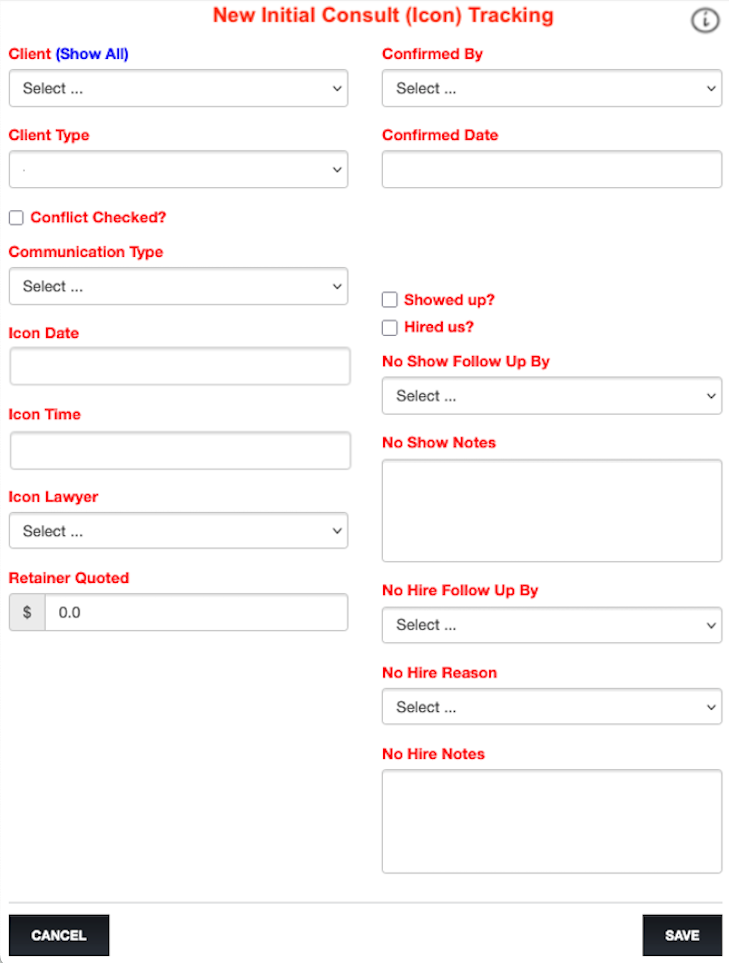
First use: Business Staff uses this More Family Law Profits form to enter a New Initial Consult (Icon) Tracking.
1. Select “Client”
2. Select Communication Type
3. Add Icon appointment Date and Time
4. Select Icon Lawyer
5. Add Retainer amount quoted
Second use: Business Staff uses this form again to record confirming the appointment with the potential client and adding that Confirmed Date.
Third use: Business Staff uses this form to add follow-up information. When more clients are needed, this follow-up procedure will help sway potential clients to hire you.
Thank you, More Family Law Profits team member. You deserve More Family Law Profits and More Family Law Profits loves helping you.